Logo Rolcsi's Professional Website
  • Home
  • About
  • Skills
  • Experiences
  • Education
  • Posts
  • Dark Theme
    Light Theme Dark Theme System Theme
Logo Inverted Logo
  • Posts
  • Downloads
  • Nilan CTS602
    • Quick Start
    • Licensing
    • User Interface
    • Control from scenes
    • Variables
    • Wiring
  • Nilan CTS700
    • Quick Start
    • Licensing
    • User Interface
    • Control from scenes
    • Variables
  • Pego Humidifier
    • Quick Start
    • Licensing
    • User Interface
    • Control from scenes
    • Variables
  • Terms and Policies
    • Terms and Conditions
    • Privacy Policy
  • Credits
Hero Image
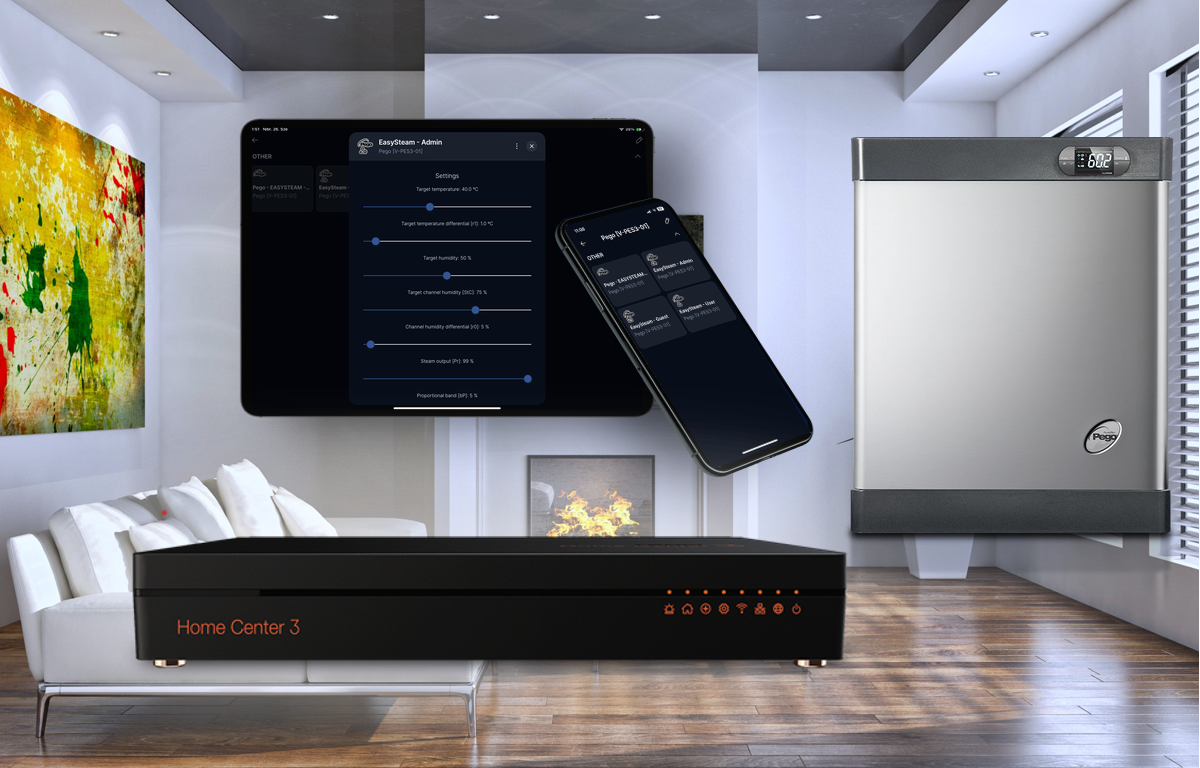
User Interface

Assuming that the correct license key has been successfully specified as the value of the corresponding variable in the QuickApp, 3 childApps have now been created under the original main QuickApp User levels You may have noticed that some device names are suffixed with Guest, User or Admin. This indicates which of the three user levels is recommended for the given QuickApp. Based on these, you can decide which users you give which intervention options, that is, which QuickApps will be visible to which users. Each level (Guest, User and Admin) gives increasing privileges, so everything is available at higher levels that was available at lower levels. Therefore, for example, in a single user configuration, the Admin level is sufficient, the others can be hidden.

Monday, November 10, 2025 | 2 minutes Read
Hero Image
How to use in scenes

All values that are shown or can be modified via the QuickApp are also available externally, for example from a scene. The values can be retrieved with the help of the json object published and periodically updated in the QuickApp’s values variable, while they can be written by calling the set_value() function of the QuickApp with the appropriate parameters. The QuickApp also publishes its own ID in a global variable. You can set the name of this global variable in the QuickApp variable called app_name, e.g.:

Monday, November 10, 2025 | 3 minutes Read
Hero Image
Pego Quick Start

Requirements A Pego EasySteam Humidifier with up-to-date firmware A correctly installed and configured RS485-TCP Gateway described here A Fibaro Home Center 3 with software version 5.170.16 or greater. Connecting all the above to the same network so that they can see each other. Installation Download Pego QuickApp. Log into your Home Center as Admin. Install the QuickApp: a) Go to Settings -> Devices -> Add device b) Choose “Other Device” c) Upload file with .fqax extension.

Monday, November 10, 2025 | 2 minutes Read
Hero Image
How to use in scenes

All values that can be managed in QuickApps are also available externally, for example from a scene. The values can be retrieved with the help of the json object published and periodically updated in the QuickApp values variable, while they can be written by calling the set_value() function of the QuickApp with the appropriate parameters. The QuickApp also publishes its own ID in the NilanQAID global variable after installation to make it easier to access its own variables.

Monday, November 10, 2025 | 2 minutes Read
Hero Image
Connecting CTS602 to LAN

Although we recommend that you hire a professional to set up the hardware connection, you can of course do it yourself by following the instructions below. For specific configurations other than those described here, please refer to the documents on the Nilan website. Do not hesitate to contact me in a comment or by e-mail if you encounter any problems or you have managed to configure your device in a different way to the one described here, or if you need clarification or additional information. I will try to keep this page up-to-date with new information.

Monday, November 10, 2025 | 4 minutes Read
Hero Image
How to use in scenes

All values that are shown or can be modified via the QuickApp are also available externally, for example from a scene. The values can be retrieved with the help of the json object published and periodically updated in the QuickApp’s values variable, while they can be written by calling the set_value() function of the QuickApp with the appropriate parameters. The QuickApp also publishes its own ID in a global variable. You can set the name of this global variable in the QuickApp variable called app_name, e.g.:

Monday, November 10, 2025 | 3 minutes Read
Hero Image
User Interface

Subsystems Assuming that the correct license key has been successfully specified as the value of the corresponding variable in the QuickApp, 9 ChildApps (aka. Subsystems) have now been created under the original main QuickApp The names of the subsystems consist of two parts connected by a hyphen. The initial part refers to the subsystem within the device: Ventilation: the ventilation subsystem DHW: the domestic hot water production subsystem HPS: the secondary heat pump, which can be geothermal (GEO) or air-to-air (AIR) subsystem The second part of the name refers to the user level, so that different users can be given personalized privileges as installer or admin. The following user levels are available:

Monday, November 10, 2025 | 3 minutes Read
Hero Image
Credits

I use resources from the following providers on my website: Hugo Toha Theme My website is built using the Hugo Toha Theme, an open-source and versatile theme designed for Hugo static websites. This theme is distributed under the MIT License, which allows for free use, including commercial purposes. We extend our gratitude to the developers of the Hugo Toha Theme for making it available to the public. As required by the MIT License, we acknowledge the original authors of the Hugo Toha Theme. If you wish to learn more about the theme or contribute to its development, visit the Hugo Toha Project Page.

Wednesday, February 26, 2025 | 1 minute Read
  • ««
  • «
  • 1
  • 2
  • »
  • »»
Navigation
  • About
  • Skills
  • Experiences
  • Education
Contact me:
  • hello@rolcsi.hu
  • +36 20 5233532
  • Skype rolcsi11
  • Viber +36205233532